1. Triangular Hull Moving Average + Volatility Strategy Description
A Triangular Hull Moving Average (a fast, low-lag smoothing of price) drawn as a strip of candle-shaped bars whose body tracks the line's own last two bars of movement and whose wicks stretch out by a Hull-smoothed measure of recent candle range. The colour flips the moment the line's slope reverses, triangle markers mark that exact bar, and a small dashboard reports the current trend arrow and how high today's volatility sits relative to the last 1000 bars.
1.1 Indicator Concept
The indicator combines two separate ideas into one drawing: "Where is a fast, low-lag trend line pointing right now?" and "How wide have candles been swinging lately, compared with the widest they've swung in the last 1000 bars?" Both answers are packed into a single ribbon of candle-shaped bars running along the chart.
- The trend line is a Triangular Hull Moving Average (THMA) — a specific recipe of three weighted averages (at length, half-length and a third of the length) combined and smoothed once more, designed to track price closely with far less lag than a plain moving average of the same length.
- Direction comes from comparing the line to itself, two bars back. There is only ever one THMA line; the indicator also looks at what that same line's value was 2 bars ago and treats "current value above/below that 2-bars-ago value" as rising/falling.
- The body of each drawn "candle" is the line's own 2-bar move. Instead of plotting a simple line, the indicator uses plotcandle() with the current THMA value as one edge and the value from 2 bars ago as the other — so the body's height and direction literally show how far and which way the line has moved recently.
- The wicks are a volatility gauge, not real price wicks. They extend beyond the body by a Hull-smoothed average of recent candle ranges (high − low), so a wider wick means candles have recently been swinging more widely — this has nothing to do with the actual wicks of the underlying price candles.
- A flip in slope is the only signal. The moment the line crosses its own 2-bars-ago value (changes from falling to rising, or the reverse), a triangle marker appears and the colour of everything changes.
In short: a low-lag Hull trend line, visualised as a candle ribbon whose body shows its own recent move and whose wicks show recent volatility relative to the last 1000 bars, with markers and a small dashboard built around the moments its slope flips.
1.2 Indicator Features
-
Display:
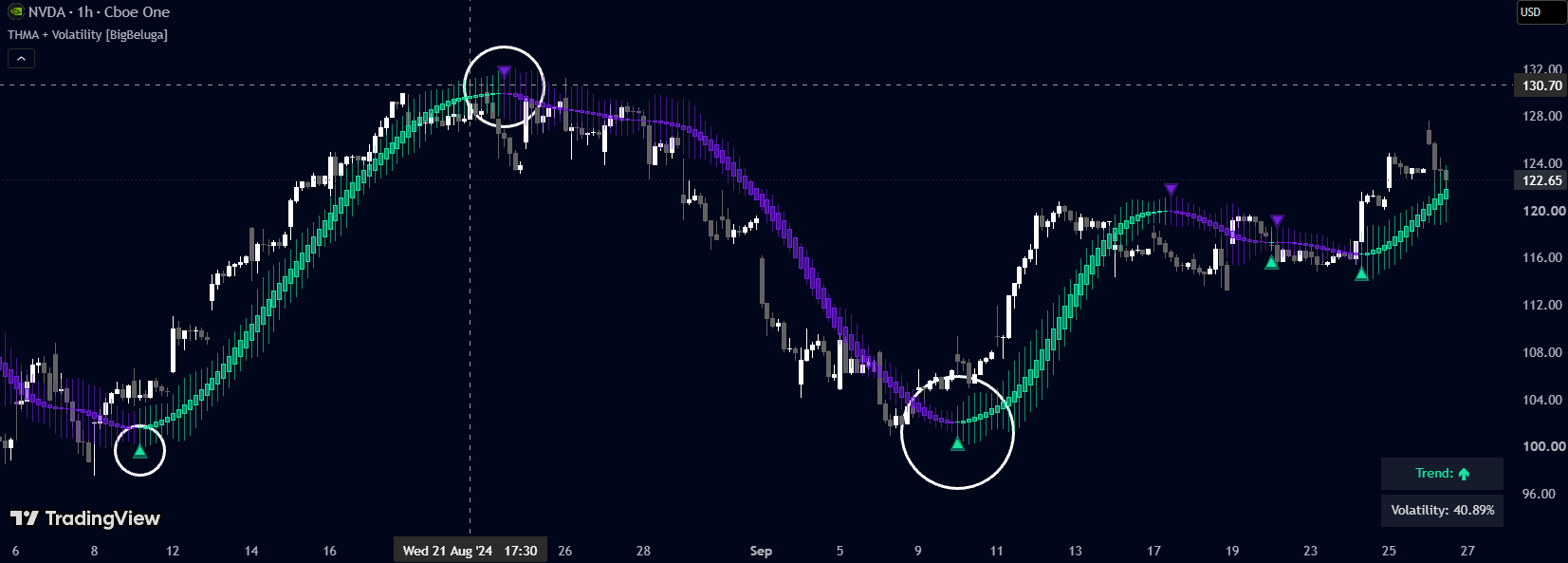
- The THMA candle ribbon: one "candle" per bar, body from the current THMA value to its value 2 bars ago, wicks extended by the volatility measure on each side. Coloured green-teal while the line is rising, purple while falling, with a fully opaque border outline regardless of the "Volatility" setting.
- Two body/wick styles (controlled by "Volatility"): with it on, the body is semi-transparent and the wicks are visible at the same transparency, so the volatility reading is visually readable candle by candle; with it off, the body becomes solid/opaque and the wicks become fully invisible — the volatility number keeps being calculated and shown in the dashboard either way, only the wick drawing is hidden.
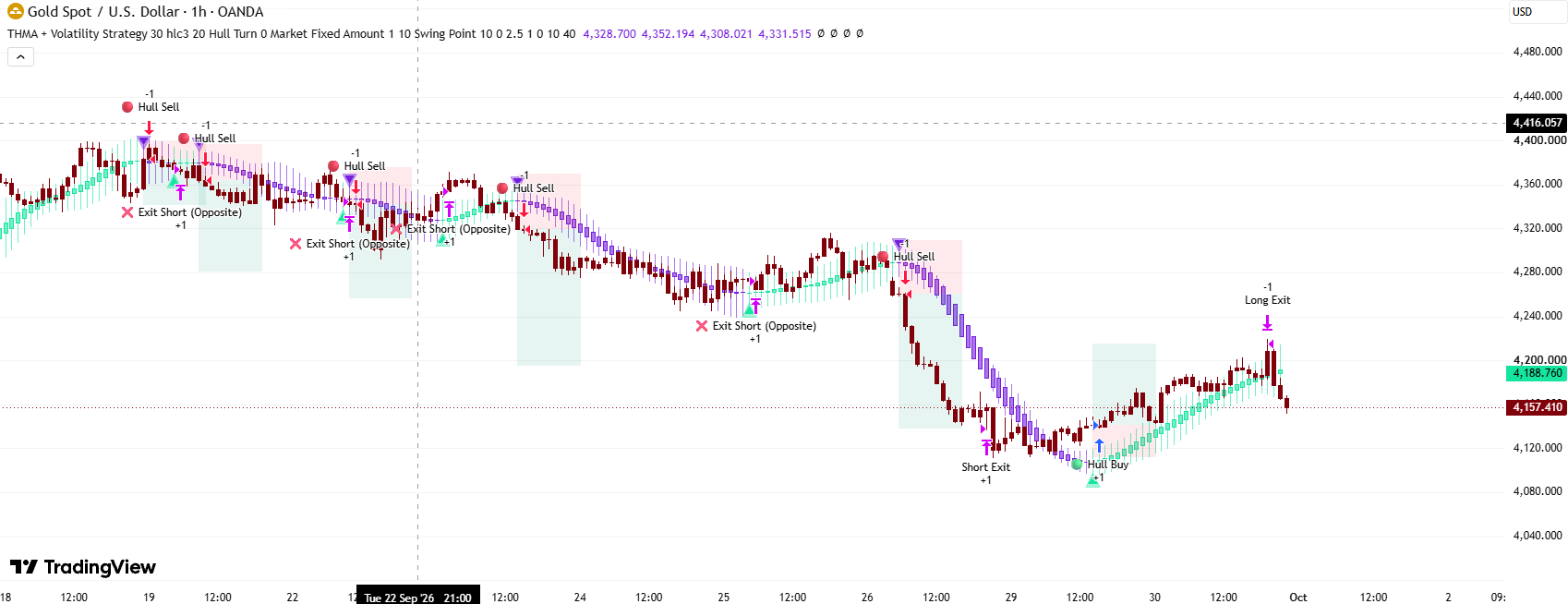
- Triangle markers only on the bar where the slope flips: a green-teal triangle below the line on an up-flip, a purple triangle above the line on a down-flip, each drawn as a small semi-transparent halo plus a tiny solid centre.
- A 2-row dashboard (bottom-right, last bar only): the current trend arrow (↑/↓, remembered from the most recent flip) and the current volatility reading as a percentage of its own 1000-bar maximum.
- Alerts: The indicator has NO alertcondition() calls.
1.3 How to Use the Indicator
- Read the ribbon's colour as the trend filter. Green-teal means the Hull line is currently higher than it was 2 bars ago (rising); purple means it is lower (falling). Treat a colour change as the indicator's only directional signal.
- Use the triangle markers to catch the exact flip bar without having to watch the ribbon's colour tick by tick — they only appear on the bar the slope actually turns.
- Read wick length as "how wide candles have been swinging lately", not as price support/resistance. A wick stretching far above and below the body says recent candle ranges are close to the widest seen in the last 1000 bars; a thin wick says the opposite.
- Turn "Volatility" off if you just want a cleaner directional ribbon — this only hides the wicks and makes the body solid; it does not stop the volatility percentage from being tracked and shown on the dashboard.
- Use the dashboard's "Volatility" percentage as a relative reading, not an absolute one. 80% means today's candle-range reading is 80% of the way to the highest reading seen anywhere in the last 1000 bars — it says nothing about the actual point/percentage size of that range.
- Adjust "Length" for how fast the line itself reacts (shorter = more responsive but more flips; longer = smoother but slower to turn), and "Volatility" length (the small unlabelled number next to the checkbox) for how smooth the wick reading is, independently of the main line.
1.4 How the Indicator Works
Inputs & their role
- len_ ("Length", integer, default 40, min 1): the THMA's smoothing length. Example: at 40, the three internal weighted averages use roughly 13, 20 and 40 bars; at 20, roughly 7, 10 and 20 bars — a faster, twitchier line with more flips.
- source ("Source", price series picker, default close): which price series the THMA is built from.
- volat ("Volatility", tick box, default on, same row as the length below): whether the candle ribbon's wicks are drawn and the body is semi-transparent (on) or the wicks are hidden and the body solid (off). Display only — the volatility number itself is always calculated and always shown on the dashboard.
- len_vol (unlabelled number field on the same row as "Volatility", default 15): the smoothing length of the candle-range (wick-length) measure — completely independent of len_. Example: 15 → a moderately smoothed range reading; 5 → a twitchier one that reacts to single wide candles more strongly; 50 → a much smoother, slower-changing reading.
- color_u / color_d (two colour swatches, no titles, one row, defaults green-teal #16e5a0 and purple #741ddd): the rising / falling colour used for the ribbon, the markers and the dashboard's trend text. Colours only.
Hard-coded constants (NOT inputs)
- The 2-bar comparison offset: the line is always compared to its own value 2 bars back, for both the slope colour and the crossover signal — not adjustable.
- The 1000-bar / 100th-percentile volatility ceiling: the reference "maximum" the current volatility reading is measured against is the highest value the Hull-smoothed candle range has reached anywhere in the last 1000 bars — a fixed window, independent of len_vol.
- The marker offset: ATR(200) — pushes the up/down triangles below or above the line so they don't sit on top of it.
- Dashboard placement/size: bottom-right, 10 columns × 10 rows allocated, only 2 cells used, drawn only on the chart's last bar.
Main logic blocks
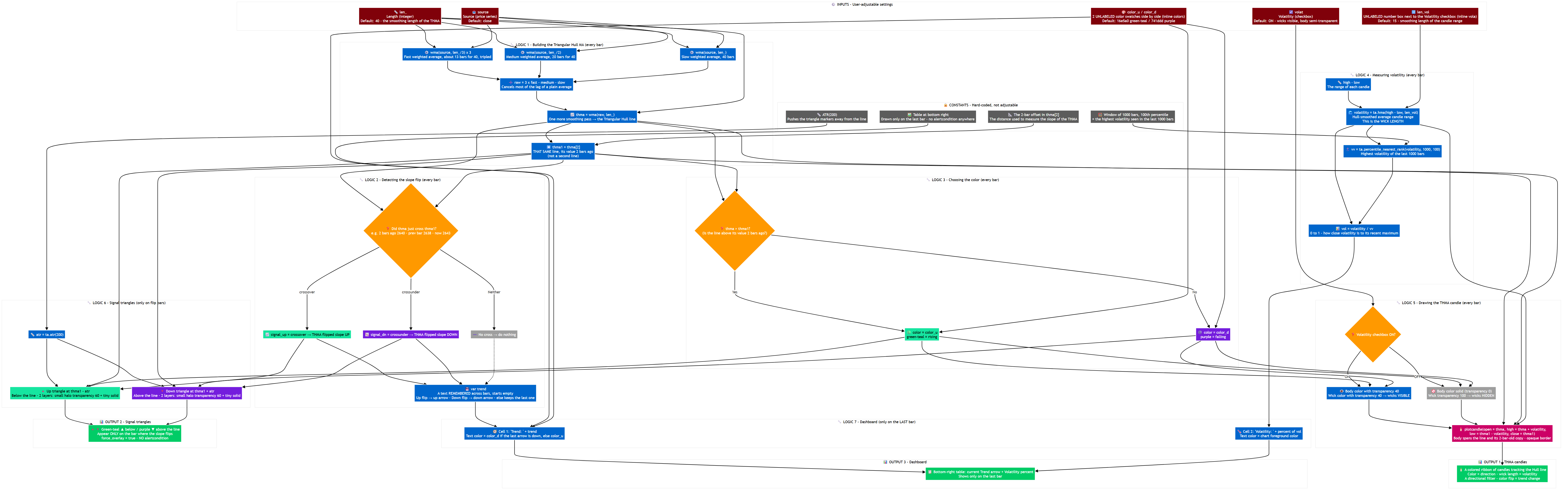
⏱️ Flow 0 — Order of work on every candle
- ① build the THMA value for this bar → ② compare it with its own value 2 bars back to detect a slope flip and update the remembered trend arrow → ③ decide the ribbon's colour from the same comparison → ④ measure recent candle-range volatility and scale it against its own 1000-bar ceiling → ⑤ draw the candle-shaped bar (style depends on "Volatility") → ⑥ on a flip bar only, draw the triangle marker → ⑦ on the chart's last bar only, update the dashboard.
📐 Flow 1 — Building the Triangular Hull Moving Average
- Three weighted moving averages of source are computed, over len_ ÷ 3, len_ ÷ 2 and len_ bars. They are combined as 3 × (shortest) − (medium) − (longest), which cancels out most of the lag a single weighted average would otherwise have, and the result is smoothed once more with a final len_-bar weighted average — giving thma, the one and only trend line this indicator plots.
- thma1 = thma[2] — not a second, separately-calculated line, simply the same line's own value from 2 bars ago, kept around for every comparison that follows.
🔀 Flow 2 — Detecting the slope flip
- signal_up = crossover(thma, thma1): the line's current value has just risen above what it was 2 bars ago, having been at or below it the bar before. signal_dn is the mirror (crossunder).
- A remembered text value (trend, starts empty) is updated only on a flip bar — an up-arrow on signal_up, a down-arrow on signal_dn — and simply keeps whatever it was last set to on every other bar. This is what the dashboard's "Trend" row reads from.
🎨 Flow 3 — Choosing the colour
- color = thma > thma1 ? color_u : color_d — simply whether the line is currently above or below its own value 2 bars back. This single comparison drives the ribbon's body/wick/border colour, the triangle markers' colour, and the dashboard's trend-text colour.
🌊 Flow 4 — Measuring volatility
- volatility = HMA(high − low, len_vol): a Hull-smoothed average of each candle's full range (high to low) — a volatility reading, not literally "the wicks" of the underlying candles.
- vv = 100th percentile of volatility over the last 1000 bars — in practice, the highest volatility reading seen anywhere in that window.
- vol = volatility ÷ vv: a 0-to-1 reading of how close today's smoothed range is to the highest it has been over the last 1000 bars. Example: current smoothed range 18, highest over 1000 bars 24 → vol = 0.75, shown on the dashboard as 75%.
🕯️ Flow 5 — Drawing the THMA candle
- plotcandle(open = thma, high = thma + volatility, low = thma1 − volatility, close = thma1): the body spans from the current THMA value to its value 2 bars ago (so its height and direction show the line's own recent move), while the high/low stretch further out by the volatility measure on each side, giving the wicks.
- With volat on: body 40% transparent, wick 40% transparent (same as the body, so it reads as one coloured shape) — both visible. With it off: body fully opaque (0% transparent), wick 100% transparent (invisible) — only a solid block remains, no wick. The border is always fully opaque either way.
🔺 Flow 6 — Signal triangles
- On signal_up: an up-pointing triangle at thma1 − ATR(200) (below the line), drawn as a larger 60%-transparent halo plus a tiny fully opaque centre, in whatever colour Flow 3 set for that bar. On signal_dn: the mirror, a down-pointing triangle at thma1 + ATR(200) (above the line).
🗂️ Flow 7 — The dashboard (last bar only)
- Row 0 — "Trend: " + arrow: the remembered up/down arrow from Flow 2, text coloured color_d if the last flip was down, otherwise color_u.
- Row 1 — "Volatility: " + percentage: vol from Flow 4, shown as a percentage, in the chart's neutral text colour.
Outputs & their role in trading
- The candle ribbon: a low-lag directional filter — colour is the trend, body length is how fast it has been moving, wick length is how wide candles have recently swung.
- The triangles: the exact bar the slope turned.
- The dashboard: a one-glance summary of the current direction and how stretched current volatility is relative to the last 1000 bars.
- The candle ribbon's high/low are not guaranteed to bracket the body. high = thma + volatility and low = thma1 − volatility are computed independently of which of thma/thma1 is larger; on a very fast 2-bar move combined with a small, heavily-smoothed volatility reading, it is possible for the computed high to sit below the body's own top (or the low above its bottom). TradingView's candle renderer generally copes with this without erroring, but the visual can look slightly unusual on such bars.
- "Volatility" (the checkbox) only changes how the wicks and body are drawn — it never stops the volatility number itself from being calculated or shown on the dashboard. Turning it off is purely cosmetic for the ribbon.
- The 1000-bar volatility ceiling needs 1000 bars of history to be fully meaningful. On a symbol or timeframe with less history than that, vv is measured over whatever history is available, so early readings of "% of maximum" are relative to a smaller sample.
- No alerts. A flip is only visible on the chart (colour change + triangle); anything event-based would need to be added by hand.
- The local variable color shares its name with Pine's built-in color type. This is legal but is why the script immediately copies it into color1 before using it inside color.new(...) calls — a defensive habit, not a functional difference.